Access Keys - Keyboard Shortcuts for Facebook Users with Disabilities

Facebook, since its founding on February 4, 2004 has grown to an extent even its founder has not dreamed of when it was started. Today any person can create their own Facebook profile for free, only catch being aged 13 or more.


Since Facebook has earned so many followers from all age groups, genders, nationalities, diversification, people from all walks of life should have access to it - regardless of their differences. In facebook's noteworthy addition - it has added accessibility features for people with disabilities.

Keyboard shortcuts for people with disabilities - thekeyponderer.blogspot.com


Variations - intended recipients

For people with disabilities, Facebook has added options to navigate it with keyboard shortcuts. This works with any type - PC wireless keyboards, mac wireless keyboards, or any general desktop ergonomic keyboards like the Microsoft Wireless Keyboard 3000. However, to make the best use of this article, one should definitely know how to control the computer without a mouse using the computer arrow keys in general. 

For other general keyboard shortcuts, read this post –

Known as Access keys, these are for keyboard-only users. The shortcuts provided by facebook are given as browser-specific for all major browsers like Google Chrome, Mozilla Firefox, Apple's Safari and Microsoft's Internet Explorer.

The following are the access keys (keyboard shortcuts):


  • Internet Explorer for PC: Alt + #, then Enter
  • Firefox for PC: Shift + Alt + #
  • Safari for Mac: Ctrl + Opt + #
  • Firefox for Mac: Ctrl + Opt + #
  • Chrome for Mac: Ctrl + Opt + #
  • Chrome for PC: Alt + # 

Access Keys

  • 0 - Help
  • 1 - Home
  • 2 - Timeline
  • 3 - Friends
  • 4 - Inbox
  • 5 – Notifications
  • 6 – Account Settings
  • 7 - Privacy
  • 8 - About
  • 9 - Terms
  • m - New Message 

Keyboard Shortcuts

  • c - Comment when on a story in News Feed
  • j and k - Scroll between News Feed stories
  • l - like or unlike a selected story
  • q - search for a friend to chat with
  • p - Focus on the text box when making a post
  • / - Search 

Web Messenger

  • CTRL + g - Search conversations
  • CTRL + q - Show/hide keyboard shortcuts
  • CTRL + Delete - Archive/unarchive conversation
  • CTRL + j - Mark as spam
  • CTRL + c - Start a new message
  • CTRL + i - Go to Inbox
  • CTRL + u - Go to Other

Have any questions, thoughts or comments to share? Please express them below in the comments box. 

Written by 


Advertisement: Related books


Top Reasons - How Does Google Make So Much Money While Being Free

There are so many reports floating online showing how Google gets its revenue. But this article can be labeled as a simple layman's article to help understand how all this works.

google making money
We all know that Google search, the most prominent of Google Products is completely free. So how does Google make so much money? Of course, it has other products like Gmail, Google Maps, Google News, Google Earth, Google Drive, but all these are free too. This is where the smartness of Google comes in to play.

A tactic which was adopted early in the scene by Google – after their initial Venture Capitalists played that pivotal role in making Google launch their search engine brain to work. These services offered by Google take immense investments and time. But these are all offered for free to majority of its users (others being corporate users who pay for certain upgrades and services). These also demand extensive resources, space and bandwidth. However, this makes the user spend more time on Google, clicking on ads - thus the resources, money and time well spent on part of Google.

Targeted Advertising

What is it that makes this giant become an even bigger one with every passing day?
Advertising. Yes. Advertising is what makes Google make so much money. It's the revenue from ads which is the highest among Google's entire revenue stream.

Regular Updates

So what do they do to make this magic happen?
They continue to drive constant innovation and new techniques. Frequent and regular updates are made to the way Google displays its ads in Google searches made by billions of people worldwide – and all those are mostly done as a silent update, never known visibly to the end user who is making a simple Google Search using their computer or in a Smartphone.

Clutter-free design with non-obtrusive approach

Google strives to help people find ads which are relevant and useful. They do this by separating ads from the regular Google search results. This way the regular or 'organic' searches are displayed without getting mixed up with 'paid' links which are the ads.
This is the revolutionary business model created by Google which the other early players in the Search Engine arena failed to accomplish. If there is one word that can summarize Google's combined search and ad aesthetics – it's 'Relevance'. Being relevant is what helps Google stand out from the other players.

Smartness

Taking this study to its next level, one must understand that Google's Search Engine is still the prominent and ranks at the top in fetching substantial revenues for Google. And searching is all about words. In Google's terminology, these are called as 'keywords'.


The above Infographic depicts clearly the top keywords that Google, bidders and publishers use.

It all works seamlessly in a virtually perfect world:
Advertisers use Google AdWords to pay for their placement of ads.
Publishers offer ad space in their blogs and websites using Google AdSense.
Users click on the ads – advertisers pay Google and the Publishers – only when they are clicked.

Conclusion

There is a lot to learn from the Google's Business Model. There are even hundreds of books on Google and its approach. No wonder there is a large fan base for what Google does and there are people who follow it religiously for what it does and stands.  It's the simplicity that helped Google skyrocket its business model in its early days. Some even say that the founders still prefer to keep the home page simple and they insist that the words on the home page do not exceed 28 words.(Source).

Since all the key players in the advertising business get benefited, this system would run effectively as long as Google runs its business with all the key players in mind while making any changes to its business model.

To share your thoughts, please write your comments below.

Posted by 

Advertisement: Related Books:


Quick View: What's new in iOS 7.1 - Carplay - Included in Apple's latest Software Update

People who upgraded to iOS 7 are well aware that the buttons were replaced with text labels. However, it left some people to 'crossroads for a second' to determine what is what. Because simplicity is often harder than complexity, as said by Steve Jobs.


But iOS 7.1 has made that division more clearer now. Getting your software update is easy - just go to Settings in your iPhone > Select General > Tap on Software Update.

This will upgrade your iPhone to its latest software.


There are fairly more visual tweaks in iOS 7.1. There are also some minor tweaks to the keyboard layouts making the keys more clearer. The major visible changes are on the dialer and power off features.

Here's whats new:


Carplay 


Siri
Siri too gets an update in iOS 7.1. As the Apple website says, Siri now knows when to stop listening.


Camera

Automatically enable HDR on iPhone 5S


Updated Look and Feel:


Other fixes include:

  • Touch ID fingerprint recognition is improved.
  • An occasional Home screen crash bug has been fixed.
  • iPhone 4 users will enjoy improved responsiveness and performance.

Source: Apple


Life is weird; Precious too! Live LIfe Happily

'Man! What a life!', exclaims a happy person.


'What the...! This life sucks!', exclaims who is yet to experience a miracle in his/her life.


As the adage goes, the light inside a church glows more beautifully when there is light from within. Similarly, life is at its best when we realize our dreams, or just even working towards our goals.
Photo courtesy: "Family Running On Meadow" by imagerymajestic - www.freedigitalphotos.net


The fun is in the journey, not the destination. Enjoy your life, today. If you are feeling down, just focus on the air that goes into your nostril right now and then exhale slowly - breathe consciously. Pick a book, start immersing yourself in that.

Hope this article finds you as a drop in an ocean that finds its oyster, exactly when you need it.

Everything has a life of its own. If it lifts you up, this post's life's task is complete.


Written by +Arun Sarathy

Life is weird; Precious too! Live LIfe Happily

'Man! What a life!', exclaims a happy person.


'What the...! This life sucks!', exclaims who is yet to experience a miracle in his/her life.


As the adage goes, the light inside a church glows more beautifully when there is light from within. Similarly, life is at its best when we realize our dreams, or just even working towards our goals.
Photo courtesy: "Family Running On Meadow" by imagerymajestic - www.freedigitalphotos.net


The fun is in the journey, not the destination. Enjoy your life, today. If you are feeling down, just focus on the air that goes into your nostril right now and then exhale slowly - breathe consciously. Pick a book, start immersing yourself in that.

Hope this article finds you as a drop in an ocean that finds its oyster, exactly when you need it.

Everything has a life of its own. If it lifts you up, this post's life's task is complete.


Written by +Arun Sarathy

Google 2014 Republic Day Doodle - Nice logo

Wish everyone a very happy Republic Day!

Today India celebrates her 65th Republic Day. Google posted a nice colorful doodle marking the Indian Republic Day. The logo has a tri-color effect with bikers dressed in green, white and saffron, riding as if in a parade.


65th Republic day for India. Google did a good job of honoring it.

65th Republic Day


Posted by 

Gmail update: Reach more people you know

Here is a cool update from the Gmail team early this year (2014).

What this update means to you?
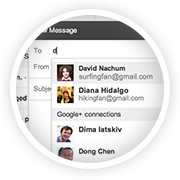
If you want to send an email to people who haven't yet exchanged the email addresses with you, then this feature might come in handy. But for this to work, what Gmail does is just suggest your Google+ connections as probably recipients when you type in the first few letters of your intended recipients. For this to work, you need not even add the email addresses to your contacts - it shows up as they are already in your Google+ contacts.


These preferences are handled and changed on your settings page. Read the newsletter I received below for more details.


Gmail update: Reach more people you know
Ever wanted to email someone you know, but haven't yet exchanged email addresses? Starting this week, when you're composing a new email, Gmail will suggest your Google+ connections as recipients, even if you haven't exchanged email addresses yet.
How it works with email addresses
Emailing Google+ connections works a bit differently to protect the privacy of email addresses. Your email address isn't visible to your Google+ connections until you send them an email, and their email addresses are not visible to you until they respond.
Receiving email from people outside your circles
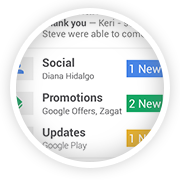
If you receive an email from someone outside your circles, it will be filtered into the Social category of the inbox (if enabled) and only after you respond or add them to your circles, can they start another conversation with you.
How to control who can contact you
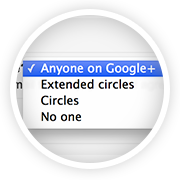
You're in control of whether people can reach you with a new setting in Gmail on the desktop. To learn more, check out the Help Center.

The Gmail Team