Google 2014 Republic Day Doodle - Nice logo

Wish everyone a very happy Republic Day!

Today India celebrates her 65th Republic Day. Google posted a nice colorful doodle marking the Indian Republic Day. The logo has a tri-color effect with bikers dressed in green, white and saffron, riding as if in a parade.


65th Republic day for India. Google did a good job of honoring it.

65th Republic Day


Posted by 

Gmail update: Reach more people you know

Here is a cool update from the Gmail team early this year (2014).

What this update means to you?
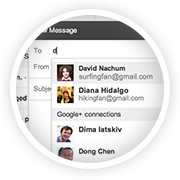
If you want to send an email to people who haven't yet exchanged the email addresses with you, then this feature might come in handy. But for this to work, what Gmail does is just suggest your Google+ connections as probably recipients when you type in the first few letters of your intended recipients. For this to work, you need not even add the email addresses to your contacts - it shows up as they are already in your Google+ contacts.


These preferences are handled and changed on your settings page. Read the newsletter I received below for more details.


Gmail update: Reach more people you know
Ever wanted to email someone you know, but haven't yet exchanged email addresses? Starting this week, when you're composing a new email, Gmail will suggest your Google+ connections as recipients, even if you haven't exchanged email addresses yet.
How it works with email addresses
Emailing Google+ connections works a bit differently to protect the privacy of email addresses. Your email address isn't visible to your Google+ connections until you send them an email, and their email addresses are not visible to you until they respond.
Receiving email from people outside your circles
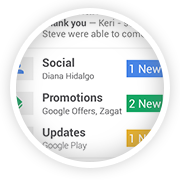
If you receive an email from someone outside your circles, it will be filtered into the Social category of the inbox (if enabled) and only after you respond or add them to your circles, can they start another conversation with you.
How to control who can contact you
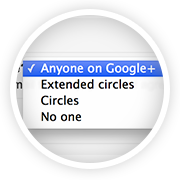
You're in control of whether people can reach you with a new setting in Gmail on the desktop. To learn more, check out the Help Center.

The Gmail Team


Quick Tech Trick # 7: How to show two time zones in your MS Outlook?

Category: Windows | Outlook | Productivity

Some of us have clients or friends outside our home country, who may live in a different time zone. Planning a meeting or an appointment which should suit best for both could be a challenge in such a situation. That's when a feature in Microsoft Outlook's Calendar comes in handy. Just follow these steps:


Tools > Options > Calendar Options > Time Zones > Check the box to show and 'Additional Time Zone'.


(Alternatively, you may also simply right click on the area where time is shown within your Calendar and choose 'Change Time Zone').


Choose your required time zone > hit 'OK'. Now you will have two time zones shown in Outlook!


Posted by 


Octocopters - Amazon's 30 Minute Delivery Robot - Prime Air

"...being at the crossroads of humanity and technology" said Steve Jobs! A well sculpted description of his life's purpose.

Interestingly it doesn't stop with Steve Jobs. It can well be applied to anything that uses technology to make people's lives better. Amazon has come up with a service called Amazon 'air prime' which uses a robot to deliver goods within 30 minutes after the order is placed.


Check this out. Not sure of its other implications, but this invention is a sure shot eye-catcher.

Written by .

Quick Tech Trick # 6: How to edit an outlook email message you've received?

Category: Windows | Productivity

This feature (example shows MS Outlook 2007) allows us to edit an email message which is an already sent one. By nature, it's not editable. However, Microsoft offers a feature through which one may edit it. This feature should not be abused though.


Here's how:

Open the email which has to be edited. Select Message tab > Actions group > Other Actions drop-down > Edit Message.

The keyboard shortcut for the above set of action is: Alt H, X, E.


Written by .


How to keep a watch on your Google AdSense revenue regularly?

Category: Blogging | Utilities

First, ensure you are using Google Chrome. Trust me, it gets better with this browser. Then install the Google Publisher Toolbar, an extension from the Google Web Store.


Now you get the point. Just click on the Google Publisher Toolbar once and it shows you:

  • that day's estimated revenue, 
  • the previous day's earnings, 
  • this month's accumulated earnings and 
  • the previous month's earnings.

It also shows the Top 5 Channels/URL Channels for today, yesterday, this week, this month and last month.


I don't know why it's called as a 'toolbar', but it does the job, well!


Quick Tech Trick # 3: How to use Notepad as a diary or a log or a Journal?

Category: Windows | Productivity

1. Open a blank Windows Notepad (type 'notepad' in the Run command)
2. Type '.LOG' without quotes
3. Save


Bam! You now have mastered the art of creating a Simple Diary! Enjoy.

Written by .


Quick Tech Trick # 2: Where is the 'Show Desktop' icon in Windows 7?

Category: Windows | Utility


In Windows 7, the 'Show Desktop' icon no longer exists. Instead, Windows chose to put it near your system tray (bottom right corner). Just move your mouse pointer to the bottom right-most corner.

Bam! You just 'showed your desktop' to yourself.


Written by .

Quick Tech Trick # 1: How to sort and filter only "Unread emails" in Gmail?

Category: Gmail | Productivity


Type "is:unread " in your Gmail search window.


Bam! You now have all your unread emails showing up!  Happy reading!

Written by .

Quick Tech Trick # 5: How to give a URL in blog comments - Wordpress, Blogger

Category: Blogging | Commenting

How do you provide a URL in the comments section of a blog?

Wordpress or Blogger - be it anywhere. You might want to provide a URL without providing the visible "https" section.
For eg. a hyperlink like this one - How to sort and filter emails in Gmail by size and more.


Here's how:

Write the other parts of your comment as usual. And whenever you want to provide a link to a word or a sentence, just use the <a> tag with the 'href' attribute as given in this format:

<a href="http://thekeyponderer.blogspot.com/">The Key Ponderer </a> 

That's it! Now you'll see the text with your URL in it.


Written by .

Warriors Needed To Save Mother Earth

Mother Earth is ever loving, kind and always forgiving. Of course if one doesn't attribute the earthquakes, tsunamis and floods as Nature's revenge on its inhabitants - flora, fauna, humans, animals, etc.

Time and again some non profit organizations, individuals raise their voices, mark their footprints for good - to stop killing north pole animals, to save tigers, to conserve water, to stop using the big old filament bulbs, to commute using public transport whenever possible, etc. One article that caught the attention is from Google's initiative - Google Green.


Click below to see what Google has to say regarding it's initiative. It's worth it.


Written by .